Agent Control Center
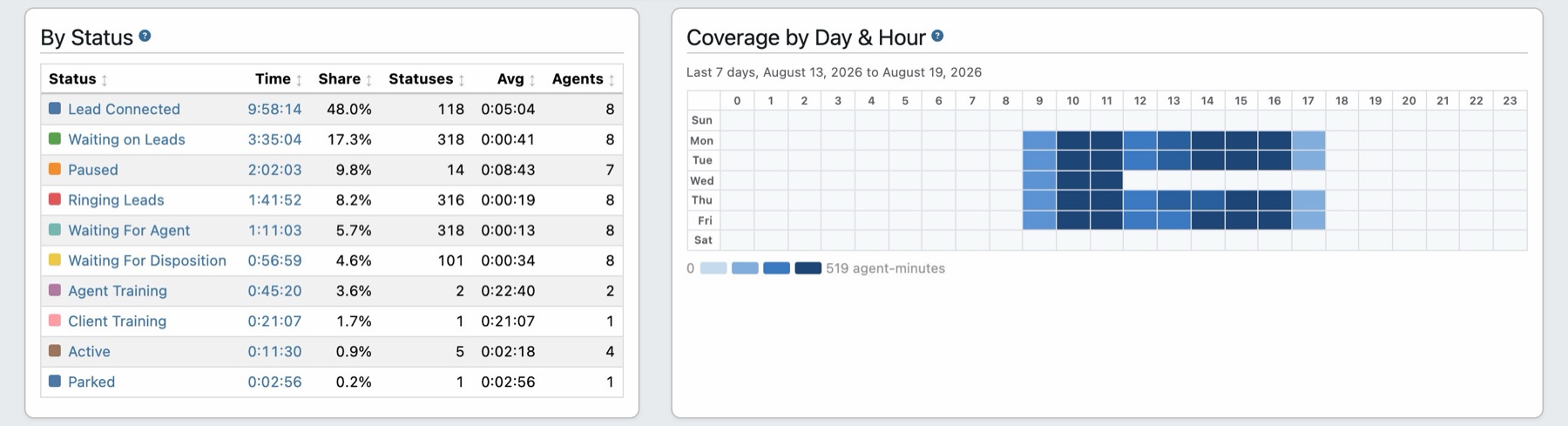
A browser-based control center where agents manage live calls, qualify leads, and route conversations from one screen — no downloads or external SIP clients required.
- Built-in WebRTC softphone — agents connect directly in the browser; SIP credentials are auto-provisioned.
- Script switching — change the interview script mid-call for different qualification paths.
- Mute, hold & transfer — control the caller's audio and hand the call to a buyer with one click.
- Find a buyer — after the interview, trigger the routing engine to match the caller with the best available buyer, with matching buyers previewed live.
Mix human agents and AI Voice Agents in the same call flow — use AI to qualify or deflect, then transfer to a human via the Agent Control Center.
One screen for the live call. Mute, hold, transfer, find a buyer, and disposition, all in the browser.
Seamless Agent Creation
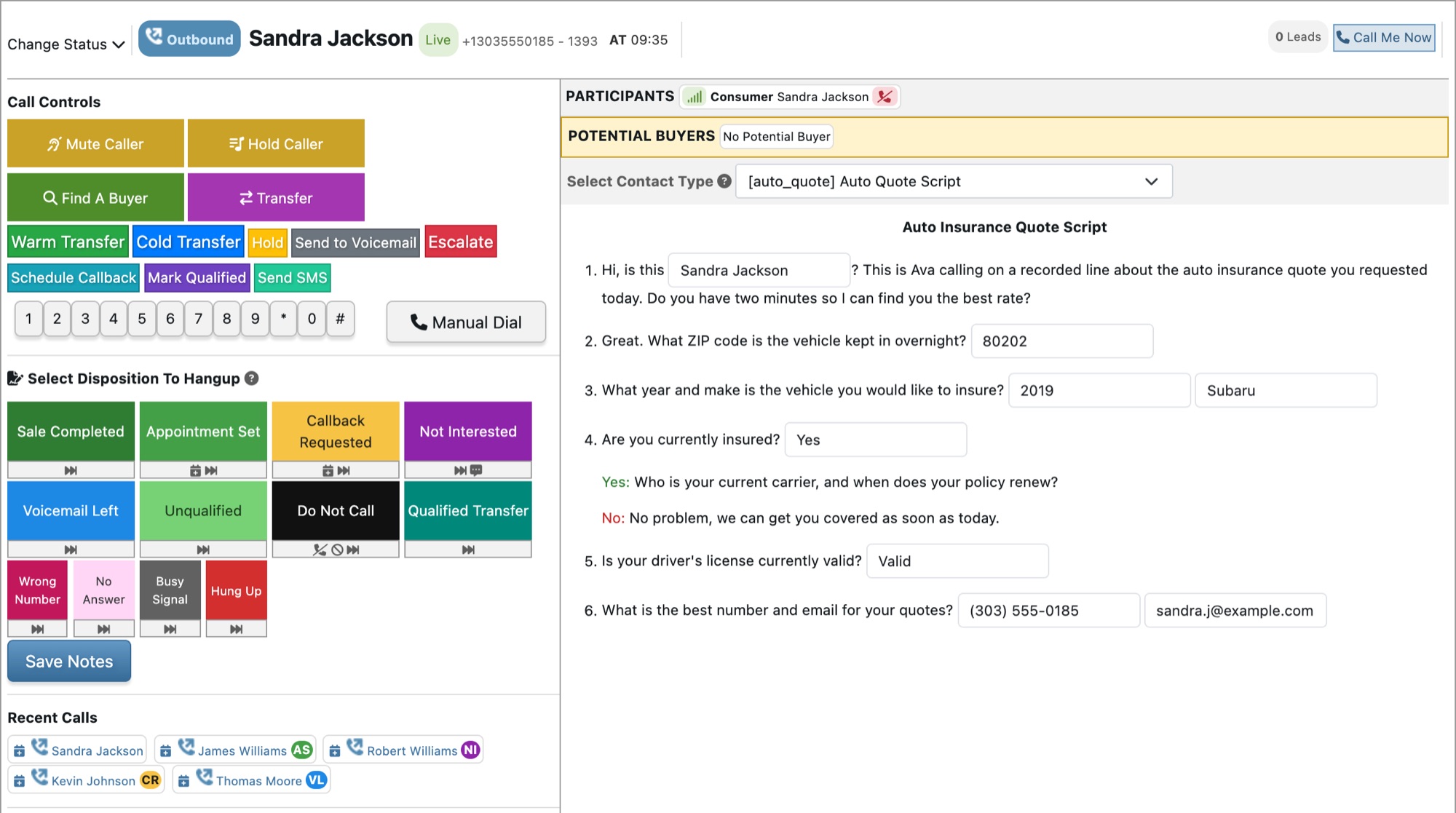
Get a whole floor into the control center at once. Configure hundreds of agents with TrackDrive's bulk uploader — import agent lists via CSV, create internal agents that need no email inbox, and assign them to offers, schedules, and call queues.
Onboard a call center fast. Provision agents in bulk from a CSV instead of one at a time.
Power Dialer
With agents on the line, the Power Dialer keeps them there. It runs a continuous cycle — finding available agents, dialing leads, screening for live answers, and bridging the call — with pacing that scales to your waiting-agent capacity.
How the Power Dialer Works
Agent Routing Modes
Match leads to agents the way that fits your team:
- Longest Wait Time — the agent idle longest takes the next call.
- Tier & Weight — prioritize top performers, with weighted distribution inside a tier.
- Hybrid — tier priority, broken by longest wait time within each tier.
- Fairness rotation — the hybrid order reverses every 5th call so lower-priority agents still receive calls.
Call Dispositions
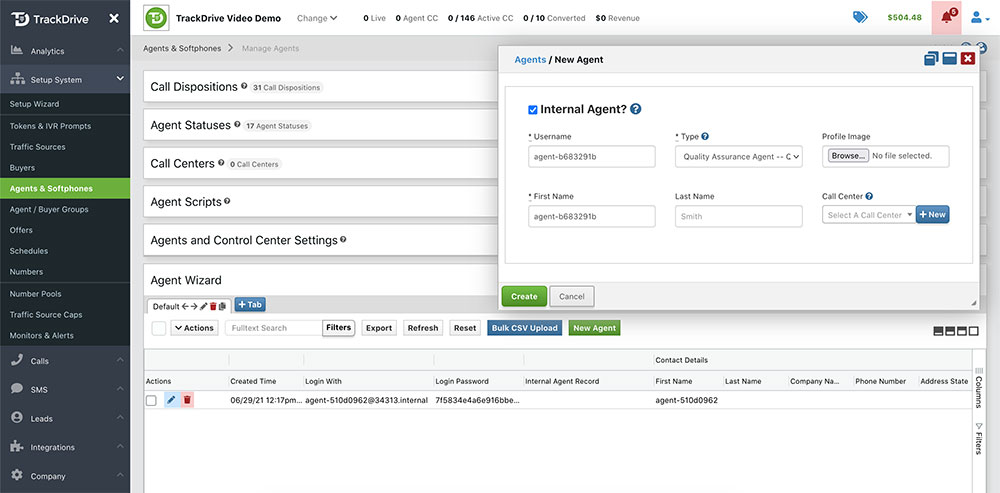
Every call ends with an outcome. Agents dispose calls to give visibility on results and surface areas to improve, and dispositions can trigger actions such as adding the consumer to your DNC, running a custom webhook, and more.
Outcomes that do work. Custom disposition codes can fire webhooks, update lead data, and add callers to your DNC.
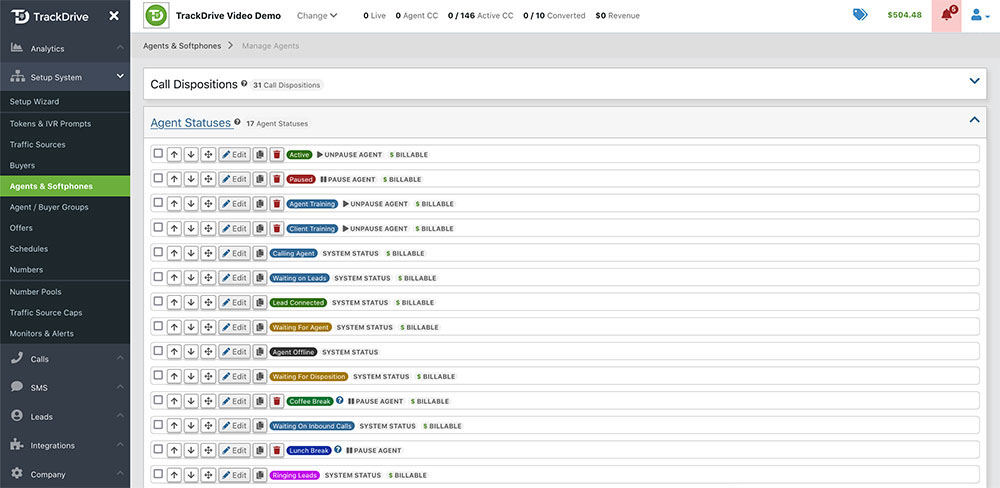
Agent Statuses
Watch the floor in real time. See each agent's current state at a glance — with a customer, ringing a lead, on lunch, and more — alongside how long they have been in it and how many calls they have handled.
See where the day goes. Live agent statuses with time tracking and calls-handled metrics.
Agent Timesheets & Productivity
Live statuses tell you what the floor is doing now. Agent Timesheets tell you what it did — every status change an agent records builds a timesheet, and the Agents dashboard totals them across your whole floor for any timeframe you pick.
- Payroll — billable hours, non-billable hours, and talk hours, using the billable flag you set on each of your own statuses. The hours you pay for, separated from the hours you do not.
- Productivity — occupancy and availability reported separately rather than blended into one “utilization” number. Low availability is a conduct conversation; low occupancy is a dialer conversation, and a single figure cannot tell you which. Dialer overhead — paid time an agent spends waiting on the system rather than on a consumer — is broken out as its own share.
- Staffing — how many agents worked, with the median shown beside the mean, so one part-time shift does not drag the average down and make a normal day look like a bad one.
Your whole floor, any timeframe. Payroll, productivity, and staffing across the top of the page.
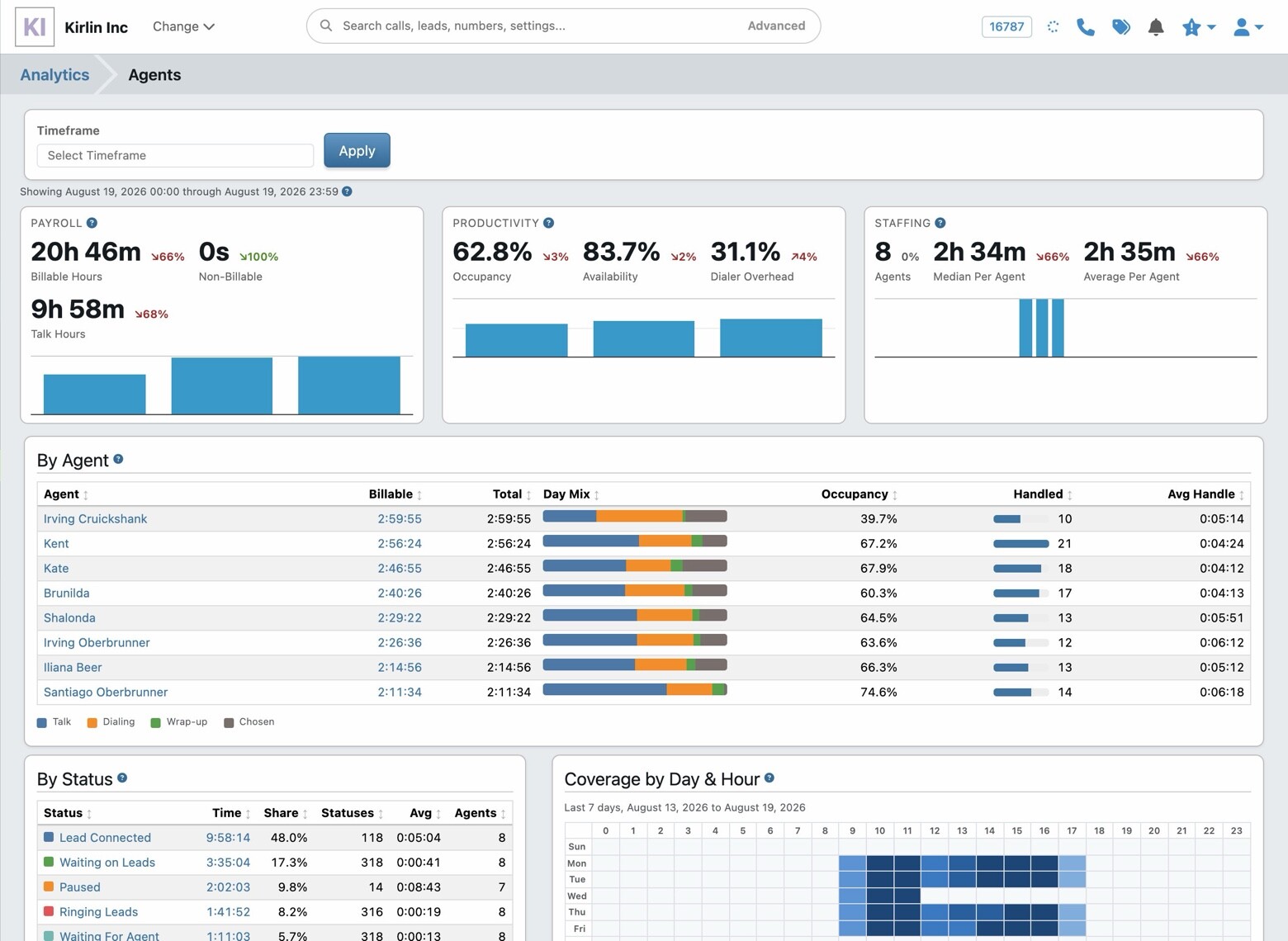
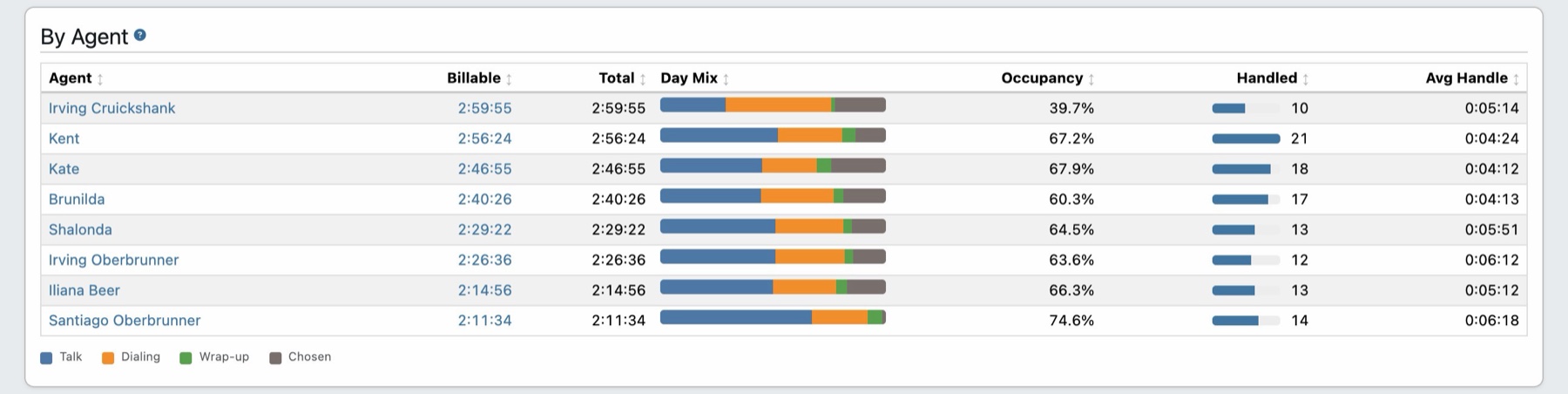
By Agent gives you one row per person: billable and total time, how the day divided between talking, dialing, wrap-up, and the statuses they chose themselves, their occupancy, how many consumers they handled, and their average handle time. Click any name or total to open the individual status rows behind the figure.
Who did what. Every agent's day, with the mix of talk, dialing, and wrap-up in a single bar.
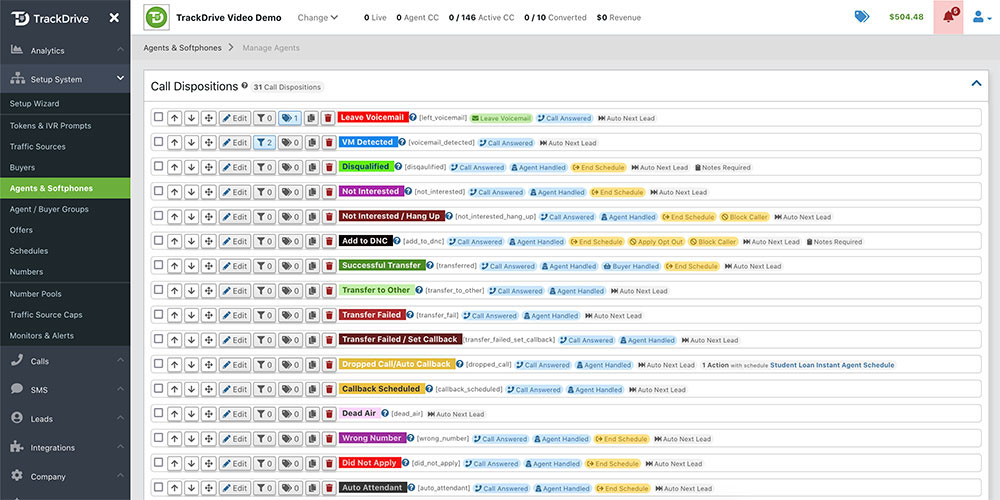
Coverage by Day & Hour shows the average agent-minutes logged in each hour of each weekday, in your account timezone rather than UTC — so a floor working nine to five reads as nine to five. Put it beside when your leads actually arrive and the gaps in your roster stop being a guess.
When your floor is staffed. A week of coverage by weekday and hour, beside the statuses that made it up.